






MyChart, the leading-edge patient portal
Our patient portal, MyChart, is powered by Epic’s electronic health record (EHR) software and gives you secure access to your health information.
There are many benefits to signing up for MyChart, such as helping you manage your health with ease and convenience. Plus, with MyChart, your care team will have your health information all in one place — even if you've been seen at multiple health care organizations.* It's a one-stop shop for your health care needs.
We make every effort to respond to portal messages within 48–72 hours.
Our portal is for non-urgent matters only. If this is a medical emergency, please call 911.
What is MyChart?
MyChart is a secure online tool that gives you access to your health records and care team. It’s available 24/7 via web or mobile app.
MyChart is also available in Spanish. Note that while most text within MyChart is translated, clinical content and messaging remain in English.
Patients can schedule telehealth or virtual visits via MyChart. Patients can use their computer or mobile device.
You can access:
- Lab/test results (released immediately)
- Visit summaries and provider notes
- Immunizations, medications, health issues
- Download/share records via the Sharing Hub
- Pay bills and manage communication preferences
Enroll and access the patient portal
You can sign up:
- Online via MyChart signup page
- By requesting an activation link from your care team or front desk
- Through an email invitation from Optum
- In person at your provider’s office (no appointment needed)
Once you have activated your account, you can visit https://epicmychart.optum.com/mychart/ and log in. The portal is also accessible through email, text, and push notifications, if you have consented to receive digital or e- communications, or have downloaded the MyChart mobile app.
Yes. Download the MyChart app from the Apple App Store or Google Play. Once installed:
- Add “Optum Medical Care” as your organization
- Use the same login to switch between health systems
- Note: MyChart account must be set up before using the app on your smartphone. App is not available for iPads
You’ll still need to enroll in Optum’s MyChart. Each organization has its own portal. Use the “Link My Accounts” feature to view records from multiple providers. Just follow these steps for Patient Authentication.
Patients do not need to wait for an invitation to sign up for MyChart. Patients can go to the MyChart signup page to easily create their account.
To update your communication preferences, sign in to your MyChart account, open the menu and search for Communication Preferences, or find it under Account Settings. Next, choose how you want to be contacted. You can turn email, text, call or mail notifications on or off for each type of message.
Appointments and messaging
Use the “Schedule an Appointment" section to book visits:
- Check in online up to 7 days before your appointment
- Complete forms, verify info, and make copayments during check-in
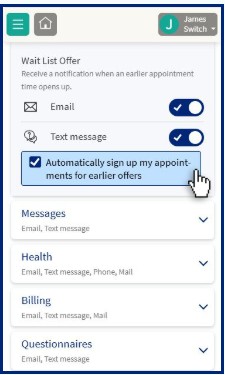
- Opt-in for Wait List updates via “Communication Preferences”
You can book:
- Primary care visits
- Specialist follow-ups
- Urgent care visits (with “I’m on my way” feature)
Log in to MyChart, go to “Appointments & Visits,” and select “eCheckin.”
- Verify your personal info and insurance
- Sign documents and make copayments
- Review allergies and health issues
- Complete any pre-visit questionnaires
This time allows you to complete your paperwork without feeling rushed. So, please do the best you can to come a bit early. This includes telehealth and virtual appointments to prevent technical issues or delays.
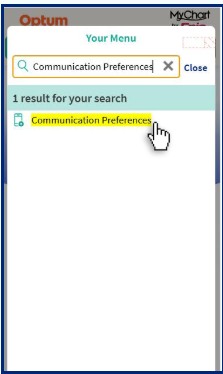
Log in to your MyChart account and open the menu, which appears near the upper-left corner.
- 1. Select “Communication Preferences”, which will appear within the “Account Settings” section. Or, you can use the search field to search for “Communication Preferences”.
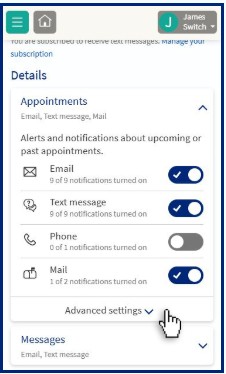
- 2. Find the “Appointments” settings and expand the “Advanced settings”.
- 3. Navigate to the “Wait List Offer” and configure the preferences to meet your needs.
Managing dependents and shared access
Proxy access is available:
- Ages 0–11: Full access
- Ages 12–17: Limited access due to privacy laws
- Age 18+: Once a child turns 18, parents, caregivers and legal guardians no longer have access to their child’s health record in MyChart. You will have to be granted access by the patient. A person 18 years old or older can grant access from their own MyChart account by going to “Share MyRecord Activity,” selecting “Friends and Family Access,” and clicking “Invite Someone.”
Once logged in to your patient portal, you can toggle between your account and dependent’s account using the icon in the very top right-hand corner (circle with a letter or picture inside).
Yes. Adults can:
- Invite someone via “Friends and Family Access”
- Revoke access anytime in account settings
- Multiple guardians (e.g., divorced parents) can have separate access
No, each patient must have their own MyChart account and login credentials.
MyChart support
Click “I Forgot My Username” or “I Forgot My Password” on the login page. Follow the prompts to reset.
Contact MyChart Support for:
- Login issues, activation codes, password resets
- Proxy access setup
- Messaging, billing, and navigation help
Support Line: 1-833-678-8687, TTY 711
*This applies to health care organizations using Epic electronic health records.
Optum Medical Care, P.C., Optum Medical Care of New Jersey, P.C. and Optum Urgent Care, PLLC (collectively “Optum Medical Care”) are physician-led organizations (the “Practice”). The Practice retains full authority over all medical decision-making and patient care. Optum provides administrative and clinical support services to the Practice. Optum does not control or direct the clinical judgment, methods, or standards of physicians or other licensed professionals. Where indicated, “Part of Optum” means the Practice is managed or owned, where permitted by law, by Optum and participates in Optum’s efforts to support physician practices in helping patients live healthier lives.
Optum is a registered trademark of Optum, Inc. in the U.S. and other jurisdictions. All other trademarks are the property of their respective owners. Optum is an equal opportunity employer.