|
The 2016 deployment season has begun! If they have not already done so, your Optum® Healthcare Advocate will be reaching out to you to help you get started on your 2016 program. Before you get started, here are some helpful reminders and hints to ensure that you set your program up for a successful year.
Preparing for 2016
- Select the best delivery option:
- Paper
- Paper & electronic (e.g., CD or e-mail)
- Electronic only
- Downloaded from InSite
- Access through the OptumPAF portal
- Timely submission of HQPAFs/PAFs: Administrative reimbursement rates will vary based on timeliness of submission of the HQPAF/PAF and medical records to Optum. The administrative reimbursement rates will be printed directly on the forms.
- Forms returned within 60 days of the last DOS submitted will qualify for full (timely) reimbursement.
- Forms returned after 60 days of the last DOS will receive a lower (late) rate of administrative reimbursement.
To ensure there are no delays in Optum receiving your forms, ensure that you are submitting:
- To the following address:
OPTUM
Prospective Programs Processing
15485 North 28th Avenue
Phoenix, AZ 85053
- Or submit them via SFTP by setting up an account with your Healthcare Advocate or calling the Optum Provider Support Center at 1-877-751-9207;
- Or submit them via fax at 1-877-889-5747.
- Reimbursement Setup Form Deadline: Account Setup Forms (ASFs) and W-9s are required to qualify for HQPAF/PAF administrative reimbursement and MUST be submitted to Optum by the program year expiration date (i.e., March 1, 2017). Failure to timely submit your ASF and W-9 acts as a waiver of any and all claims for 2016 program year administrative reimbursement. To qualify to receive administrative reimbursement, submit your ASF and W-9 now.
- HOS Survey is coming. Help us continue to drive quality improvement by engaging patients in discussions around mental health, physical health and activity, risk of falls, flu shots and any other topics that may be addressed by the Health Outcomes Survey (HOS) or the Consumer Assessment of Healthcare Providers & Systems (CAHPS) during the first half of the year.
News to note on the 2016 program:
- Introduction Packet in electronic delivery is a separate file from the packet containing the PAF/HQPAFs:
- The PAF/HQPAF introduction packet is named “PAFImportant.”
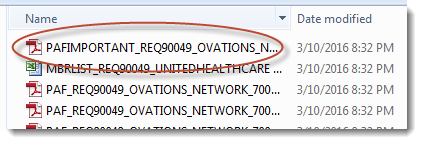
- This packet contains:
- The cover letter
- The Account Set-up Form (ASF)
- The Signature Log
- The Provider Instructions
- ER visits are not always showing in the clinical alerts even though an ER visit is listed in the Medical History section. By design, a single ER visit will not trigger a clinical alert.

- In the OA&E section, “Supply indicating diagnosis” has been changed to “Provide indicating diagnosis in the medical record.”
- Be sure to document the diagnosis in the progress note, not on the PAF/HQPAF itself.

- ICD-10 suspect guidance language:
- Additional guidance has been added to the description of 38 of the 79 HCC suspect groupers to encourage specificity of documentation required to appropriately code in ICD-10.

- Member list:
- Member lists will not match other reporting (e.g., HQSMR or CSI), as deployment volumes were determined by the health plans. To reconcile deployment, refer to the member list only.
- Member lists may not necessarily be in alphabetical order (alphabetical by last name, but not by first name). Targeted fix, mid-April. Excel versions of the member list can be re-sorted by providers.
- Address column shows member address instead of the provider address for orders with a run date prior to 03/22/2016.
- Prints as portrait instead of landscape, which causes very small font size:
- You can reset the print range and adjust to print landscape.
- Columns K-O can be adjusted so that the report can fit on one page.

If you have any questions about the PAF or HQPAF programs, please contact your local Optum Healthcare Advocate or the Optum Provider Support Center between 6:30 a.m.–4:30 p.m. PST, Monday–Friday, at 1-877-751-9207 or email us providersupport@optum.com.
Thank you for your participation in the Optum Patient Assessment Form (PAF) and the Healthcare Quality Patient Assessment Form (HQPAF) programs.
For additional information as well as publications and products available for HEDIS®, please visit the National Committee for Quality Assurance (NCQA) website at ncqa.org.
For additional information about the Medicare Advantage Five-Star Quality Rating System, please refer to: http://go.cms.gov/partcanddstarratings
|


